Working with Violations
When Dike detects a compliance violation, it automatically creates a Jira issue in your Compliance Violations project. This guide explains how to find, understand, and manage these violations using Jira's built-in features.
Finding Violations
Violations appear as Jira issues in the project you configured during setup. There are several ways to find them:
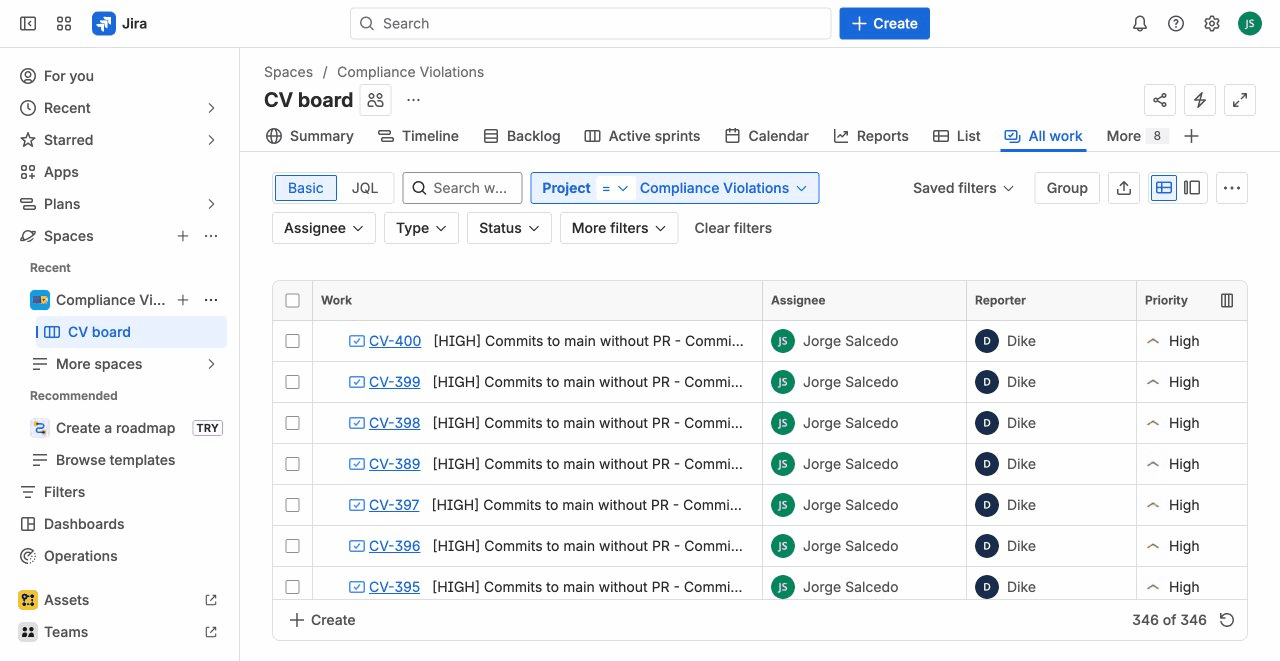
Using the Project Board
- Navigate to your Compliance Violations project (e.g., "COMPVIOL")
- Use the Board or Backlog view to see all violations
- Filter by status, assignee, or other fields
Using Issue Search
- Go to Filters → Advanced issue search
- Enter a JQL query (see examples below)
- Save useful queries as filters for quick access
Quick Access
Create a dashboard with violation gadgets or bookmark common JQL filters for one-click access to your compliance violations.
Understanding Violation Details
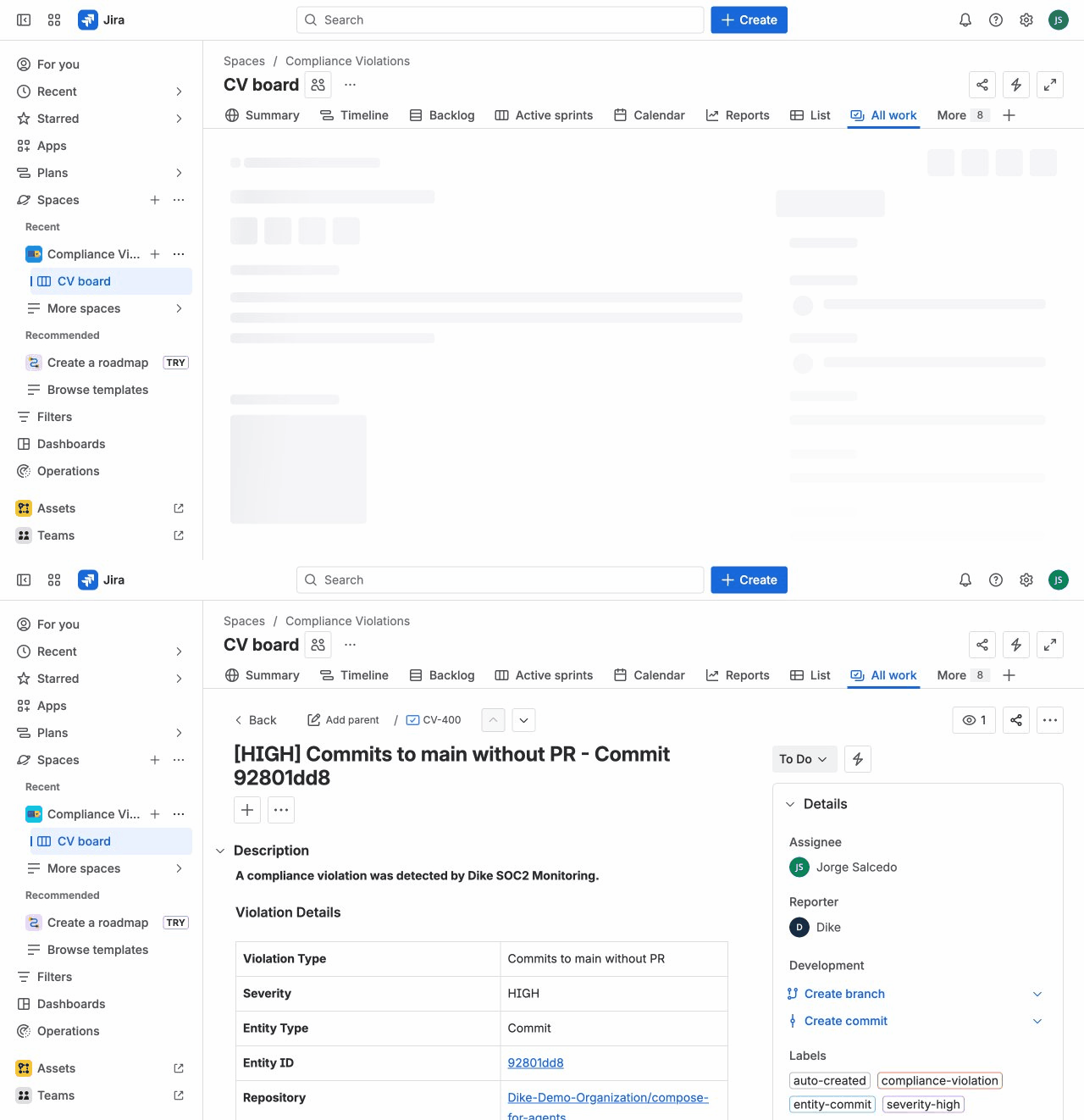
Each violation issue contains detailed information to help you investigate and resolve it.
Issue Fields
| Field | Description |
|---|---|
| Summary | Brief description of the violation |
| Status | Current state in your workflow |
| Priority | Severity level: High, Medium, or Low |
| Description | Detailed information including the rule violated |
| Labels | Entity type (commit/pull-request), repository name |
| Created | When Dike detected the violation |
Links in Description
The issue description includes direct links to:
- GitHub: View the commit or pull request on GitHub
- Related Jira Issue: The work item that should have been referenced (if applicable)
Severity Levels
| Severity | Meaning | Examples |
|---|---|---|
| High | Critical compliance issue requiring immediate attention | Direct commits to main, PRs without any approval |
| Medium | Standard violation that should be addressed | PRs with failing checks, missing issue references |
| Low | Minor issue for awareness | Documentation-only changes without issues |
Managing Violation Status
Violations progress through three statuses:
Open → Acknowledged → Resolved
Status Definitions
| Status | Meaning | When to Use |
|---|---|---|
| Open | Newly detected, not yet reviewed | Default state for new violations |
| Acknowledged | Reviewed, work in progress | Team is aware and addressing it |
| Resolved | Issue has been addressed | Violation has been fixed or accepted |
Updating Status
Update violation status through your normal Jira workflow:
- Open the violation issue
- Use the status dropdown or workflow transitions
- Move through statuses as you address the violation
Your team can customize the workflow to match your compliance process (e.g., add review steps, require comments on resolution).
Using JQL to Filter Violations
Use Jira Query Language (JQL) to find and filter violations in Jira.
Basic Queries
All open violations:
project = "COMPVIOL" AND status = Open
High severity violations:
project = "COMPVIOL" AND priority = High
Violations from last 7 days:
project = "COMPVIOL" AND created >= -7d
Filtering by Type
Commit violations only:
project = "COMPVIOL" AND labels = "commit"
Pull request violations only:
project = "COMPVIOL" AND labels = "pull-request"
Combining Filters
Open high-severity PR violations:
project = "COMPVIOL" AND status = Open AND priority = High AND labels = "pull-request"
Violations in a specific repository:
project = "COMPVIOL" AND summary ~ "my-repo-name"
Useful Saved Filters
Create saved filters for common queries:
| Filter Name | JQL | Purpose |
|---|---|---|
| Open Violations | project = "COMPVIOL" AND status = Open ORDER BY priority DESC | Daily review |
| Critical Issues | project = "COMPVIOL" AND priority = High AND status != Resolved | Urgent attention |
| This Week | project = "COMPVIOL" AND created >= startOfWeek() | Weekly report |
| Unresolved | project = "COMPVIOL" AND status != Resolved ORDER BY created DESC | Backlog review |
Replace "COMPVIOL" with your actual project key if you used a different name during setup.
Exporting Violation Data
From Jira
Export violations using Jira's built-in export features:
- Run a JQL query to filter violations
- Click Export in the search results
- Choose format:
- CSV - For spreadsheets and data analysis
- XML - For system integrations
- Print - For documentation
For SOC2 Audits
When preparing for a SOC2 audit, export:
-
All violations in audit period:
project = "COMPVIOL" AND created >= "2024-01-01" AND created <= "2024-12-31" -
Resolution status summary:
- Group by status to show how violations were handled
- Include acknowledgment and resolution timestamps
-
Trend data:
- Export monthly violation counts
- Show improvement over time
Best Practices
Daily Review
- Check open high-severity violations daily
- Acknowledge violations that are being addressed
- Close resolved violations promptly
Weekly Reporting
- Review violation trends by repository
- Identify patterns requiring process changes
- Update rules if generating too many false positives
Audit Preparation
- Ensure all violations have been triaged (none left as Open indefinitely)
- Document resolution actions for critical violations
- Export evidence showing compliance improvement over time