Accounts
Accounts are cost centres or billable buckets — a client engagement, an internal initiative, a capitalized project. Logging time to an account is what makes it routable for approval and billing review. Manage them from the Accounts view.
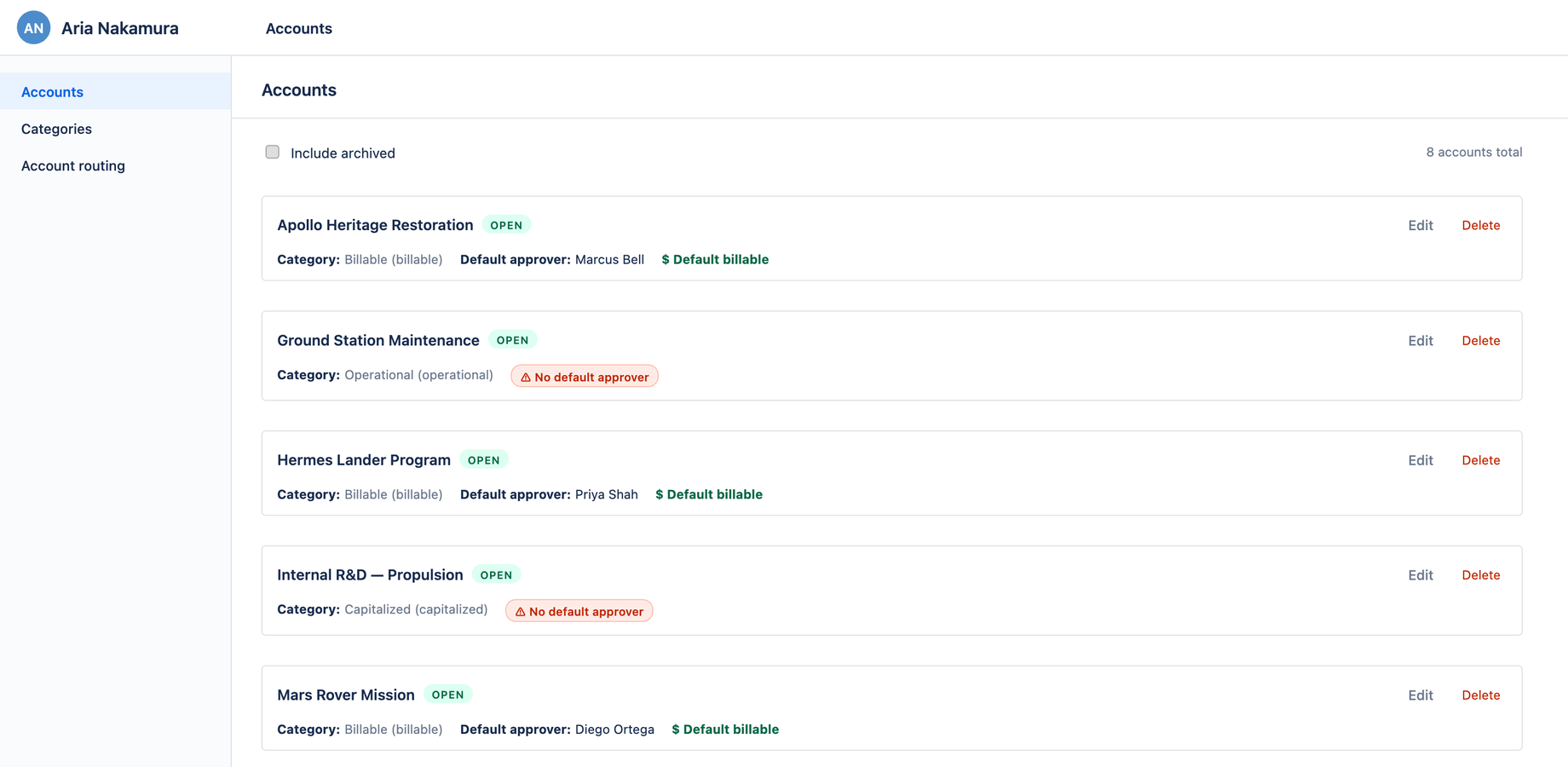
What's on an account
Each account card shows:
| Field | Notes |
|---|---|
| Name | The account's display name |
| Status | Open (usable) or Archived (hidden by default) |
| Category | Its finance classification — see Categories |
| Default approver | Who reviews time logged to this account |
Creating and editing
- Click + Add account (a full-width dashed-border button at the bottom of the list) to create one
- Use Edit on any card to change its name, category, or default approver
- Use Delete (red) to remove an account
A header count (e.g. 2 accounts total) tells you how many accounts exist.
Archiving
Toggle Include archived at the top of the list to show archived accounts. Archiving keeps an account's history intact for reporting while removing it from the pickers people use day-to-day — the right move for an account you've stopped logging against but still need in past reports.
How accounts get onto worklogs
You don't usually pick an account by hand on every worklog. Aevon resolves it through routing: a per-issue Account custom field wins, then the project's default account, then no account. Set those up so logging stays a one-step action.
Who can manage accounts
Accounts require the admin or account administrator role. See Permissions.